Resources
How to reset STB
Troubleshooting GUIDELINE
o1 Introduction
Cyber Signage System
Instead of a proprietary STB, the fully cloud-based system is designed to run on a variety of existing hardware, such as Windows PCs, Android tablets, or specific “CYBER Stick” players, using a standard web browser for content creation and delivery. This approach aims to reduce initial investment and management costs by eliminating the need for dedicated, expensive STB hardware.
STB In Digital Signage
In general digital signage terminology, an STB (Set-Top Box) or player is a small computing device that connects a display screen to a network (or runs offline content from local storage like a USB drive) and processes the data into the visual content shown on the screen.
02 Guide
Method 1: Power Restart (Most Reliable
•Recommended if the screen is frozen or not updating
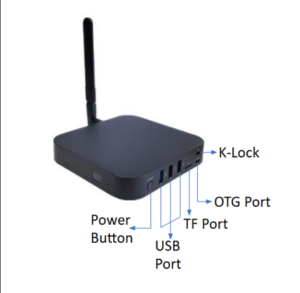
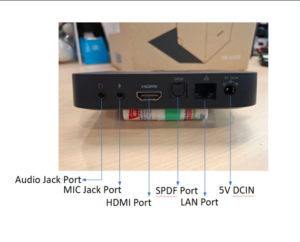
•Locate the power adapter connected to the Cyberbox
•Unplug the power cable
•Wait 10–15 seconds
•Plug the power cable back in
•The Cyberbox will boot automatically (usually takes 1–3 minutes)
Method 2: Restart via Remote Control (If Available)
•Some Cyberbox units come with a remote.
•Press Power → Select Restart or Reboot
•Confirm if prompted
•Wait for the device to restart
03 Photo
Resources